Back in mid-2019, while I was working on the Data Platform team at Krom, I ran into a problem that lingered long after it was fixed. Our Celery workers would occasionally stop processing tasks without any obvious signal.
Supervisor still showed them as RUNNING, with uptimes measured in days, but zero tasks were processed. Data pipelines quietly stalled, alerts never fired, and the only clue was an occasional Broken pipe buried in the logs.
I kept coming back to this incident long after that. The workaround we deployed was effective, but the root cause turned out to sit below the application layer, in the Linux kernel itself.
I’m writing this not just as a record of what happened, but because the issue hasn’t really gone away. Systems in production that depend on Celery and RabbitMQ still run into the same failure mode. Six years later, Celery Issue #3773 remains open, and the kernel behavior is unchanged.
This is the story of how I traced the problem down to epoll using tools like strace, /proc, lsof, and packet captures and why the final fix was architectural, not code-level, with HAProxy playing a central role.
1. Silent Workers and a Broken Pipe
It always started with the same error in the logs, usually when a worker tried to acknowledge a finished task:
[2019-07-26 03:41:35,738 - celery - CRITICAL] Couldn't ack 6209, reason:error(32, 'Broken pipe')
Yet, when I checked Supervisor, the process looked perfectly healthy:
$ sudo supervisorctl status
goku-worker                      RUNNING   pid 26738, uptime 11 days, 2:19:10
The process (PID 26738) was running but functionally frozen, acting as a true “zombie” process.
2. Inspecting the Process with strace
I needed to see what the worker was actually doing at the kernel level. Attaching strace immediately showed the problem area:
$ sudo strace -p 26738 -c
strace: Process 26738 attached

% time     seconds  usecs/call     calls    errors syscall
------ ----------- ----------- --------- --------- ----------------
 62.16    0.000023           1        25           epoll_wait
...
The worker was spending 62% of its time in epoll_wait. It was waiting for an event that would never come.
Running strace -f exposed the futile loop:
$ sudo strace -p 26738 -f
...
[pid 26738] recvfrom(5, 0x7fbead4995c4, 7, 0, NULL, NULL) = -1 EAGAIN (Resource temporarily unavailable)
[pid 26738] clock_gettime(CLOCK_MONOTONIC, {3399616, 441000388}) = 0
[pid 26738] clock_gettime(CLOCK_MONOTONIC, {3399616, 441208787}) = 0
[pid 26738] epoll_wait(15, [], 64, 502) = 0
[pid 26738] clock_gettime(CLOCK_MONOTONIC, {3399616, 944133989}) = 0
[pid 26738] recvfrom(21, 0x7fbead4995c4, 7, 0, NULL, NULL) = -1 EAGAIN (Resource temporarily unavailable)
[pid 26738] clock_gettime(CLOCK_MONOTONIC, {3399616, 944706657}) = 0
[pid 26738] clock_gettime(CLOCK_MONOTONIC, {3399616, 944870229}) = 0
[pid 26738] epoll_wait(15, [], 64, 999) = 0
[pid 26738] clock_gettime(CLOCK_MONOTONIC, {3399617, 944471272}) = 0
[pid 26738] clock_gettime(CLOCK_MONOTONIC, {3399617, 944612143}) = 0
[pid 26738] epoll_wait(15, [], 64, 1)   = 0
[pid 26738] clock_gettime(CLOCK_MONOTONIC, {3399617, 945931383}) = 0
[pid 26738] recvfrom(21, 0x7fbead4995c4, 7, 0, NULL, NULL) = -1 EAGAIN (Resource temporarily unavailable)
...
The worker kept trying to recvfrom on FD 5 and FD 21, epoll_wait on FD 15, timing out, and going back to sleep. It was waiting on dead sockets.
3. Mapping File Descriptors to RabbitMQ
To prove these were network connections, I checked the file descriptor symbolic links:
$ sudo ls -la /proc/26738/fd/5
lrwx------ 1 xxx xxx 64 Aug  2 06:05 /proc/26738/fd/5 -> socket:[99157475]
$ sudo ls -la /proc/26738/fd/21
lrwx------ 1 xxx xxx 64 Aug  2 06:05 /proc/26738/fd/21 -> socket:[99144296]
$ sudo ls -la /proc/26738/fd/15
lrwx------ 1 xxx xxx 64 Aug  2 06:05 /proc/26738/fd/15 -> anon_inode:[eventpoll]
FD 5 and FD 21 were clearly sockets, and FD 15 was the epoll instance managing them.
Using lsof confirmed they pointed straight at our RabbitMQ broker:
$ sudo lsof -p 26738 | grep 99157475
celery  26738 xxx    5u     IPv4 99157475      0t0      TCP xxx-1084:50954->rabbit.xxx-1084:amqp (ESTABLISHED)

$ sudo lsof -p 26738 | grep 99144296
celery  26738 xxx   21u     IPv4 99144296      0t0      TCP xxx-1084:38194->rabbit.xxx-1084:amqp (ESTABLISHED)
The kernel insisted the connection was ESTABLISHED. But a final look at the TCP queues told the real story:
$ sudo head -n1 /proc/26738/net/tcp; grep -a 99157475 /proc/26738/net/tcp
  sl  local_address rem_address   st tx_queue rx_queue tr tm->when retrnsmt   uid  timeout inode
  10: 8A01010A:C70A 5E00010A:1628 01 00000000:00000000 02:00000351 00000000  1005        0 99157475 2 0000000000000000 20 4 30 10 -1

$ sudo head -n1 /proc/26738/net/tcp; grep -a 99144296 /proc/26738/net/tcp
  sl  local_address rem_address   st tx_queue rx_queue tr tm->when retrnsmt   uid  timeout inode
  27: 8A01010A:9532 5E00010A:1628 01 00000000:00000000 02:00000B01 00000000  1005        0 99144296 2 0000000000000000 20 4 0 10 -1
Zero bytes in tx/rx queues indicated a ghost connection that was alive in name but dead in function.
4. An epoll Edge Case
I realized that no amount of tweaking Celery or Kombu would help because the problem ran deeper than application code.
The core insight came from this analysis: epoll is fundamentally broken 1/2. This is a known, long-standing flaw in Linux’s epoll implementation under edge cases. When RabbitMQ crashes or closes a connection uncleanly (e.g., lost FIN packet), the kernel fails to notify epoll_wait. The socket lingers in ESTABLISHED state where it appears alive in /proc but is dead in reality.
Celery’s event loop, built on Kombu and epoll, was permanently trapped waiting for an event that would never arrive.
You can’t patch the Linux kernel in production. You can’t fork Celery. You work around it.
5. Working Around It with HAProxy
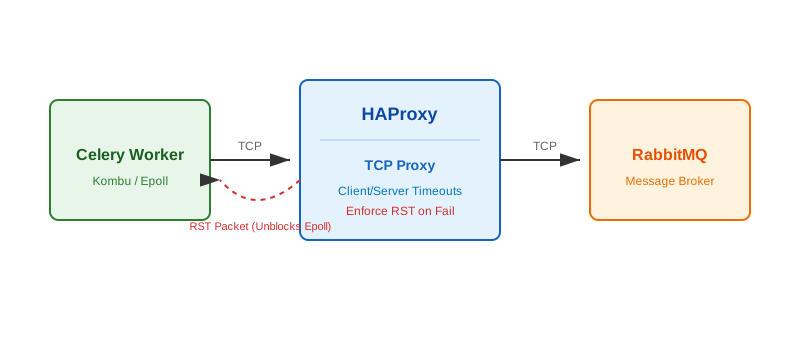
My solution was to introduce HAProxy as TCP proxy sitting between the Celery workers and RabbitMQ.
Why this worked where code failed:
- Forced disconnects: HAProxy is better at enforcing
TCPhealth. I set stricttimeout clientandtimeout servervalues. When RabbitMQ failed, HAProxy detected the failure and actively sent a cleanRSTpacket to theCeleryworker. - Bypassing the flaw: This clean disconnect forced the Celery worker out of the
epoll_waithang state with an explicit error, allowing its recovery logic to fire immediately and reconnect cleanly.
Lessons Learned
- Don’t trust the process status: A
RUNNINGprocess in Supervisor doesn’t mean it’s working. Check the internal metrics or logs. - When logs go silent, go lower:
strace,lsof, and/procare your best friends when application logs go silent. - Solve at the right layer: Sometimes the fix isn’t in the code you write, but in the infrastructure you deploy.
I learned the hard way that not every production issue has a fix in code. Some bugs live below your stack, and the only thing you can do is design around them. Adding HAProxy didn’t solve epoll, but it stopped the workers from getting stuck and in production, that was what mattered.